
Add more management accounts for Vigor3900/2960 and view their activity
This note demonstrates how to add more user accounts for each administration, and give them authority to configure the router. Furthermore, from Syslog, we can see which account made the configuration change, and when was it being made.
Add user profile
Go to User Management >> User Profile >> User Profile, click Add:
- Enable profile
- Give it Username and Password.
- Select “True” at System User and select “Admin” at Privilege Level to give this user the authority to configure the router.
- Enable Allow Web Portal Login

After configuration, profile “User” is now able to log in and modify the settings on the router.

Check with Syslog
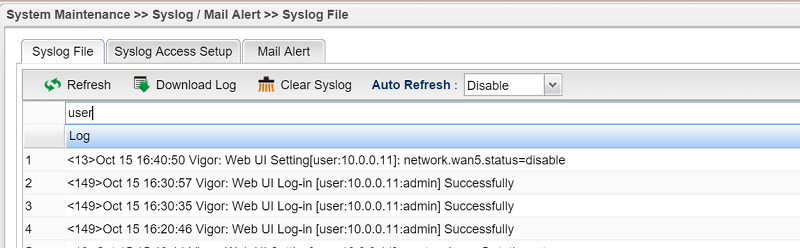
Go to System Maintenance >> Syslog/Mail Alert >> Syslog File, enter the username in the search bar to filter the relevant log. For example, network.wan5.status=disable means user “User” disables WAN 5..
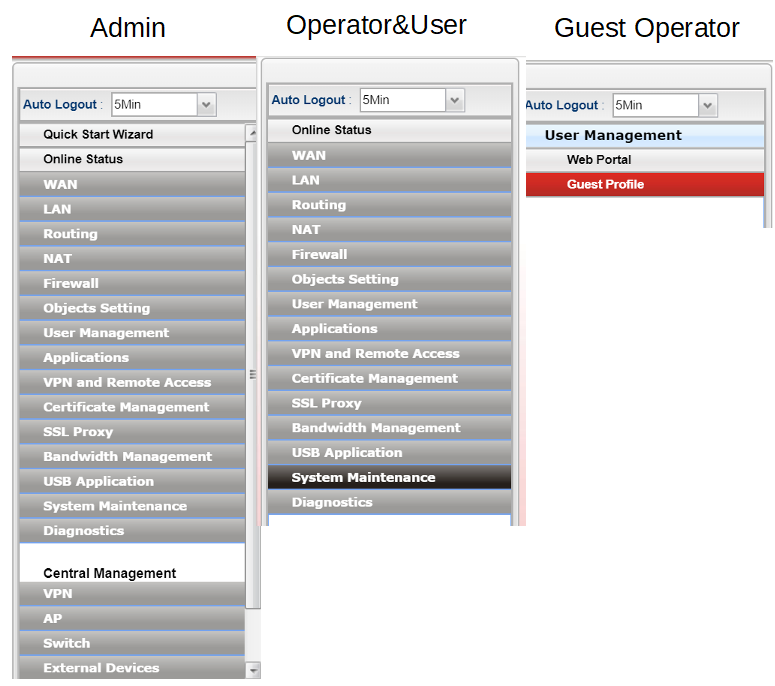
Rights of each privilege levels
- Admin: Full read/write rights
- Operator: limited read/write rights (unable to change privilege levels)
- User: limited read rights
- Guest operator: Management of the guest profiles for web portal
Published On:2015-10-16
ShareWas this helpful?