
Adjusting the Priority Between NAT Services and Local Services
In DrayOS5, the default NAT priority for local services is lower than that of the DMZ Host. As a result, after configuring a DMZ, some local services may not function properly. To address this issue, we have added a feature to adjust NAT priority. This article will guide you through the steps to modify the NAT order.
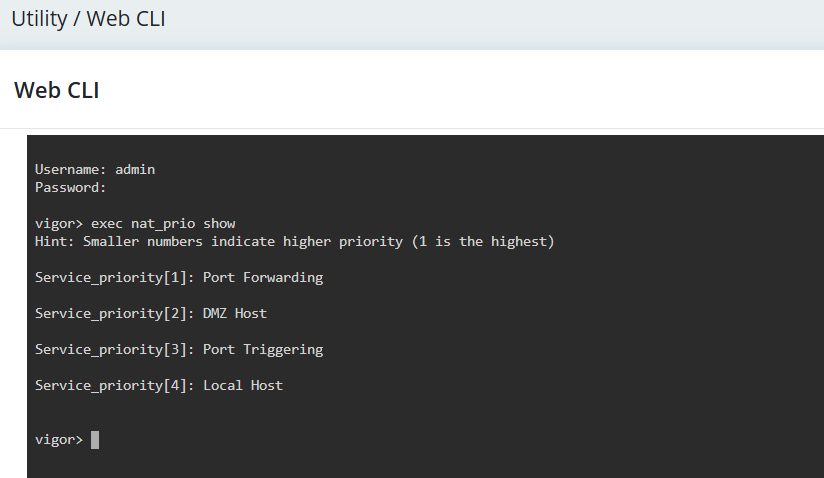
1. Navigate to Utility / Web CLI. Enter the Username and Password to login the router. Enter the command exec nat_prio show to display the current service priority. 1 indicates the highest priority.
By default, the NAT order is: Port Forwarding > DMZ Host > Port Triggering > Local Host
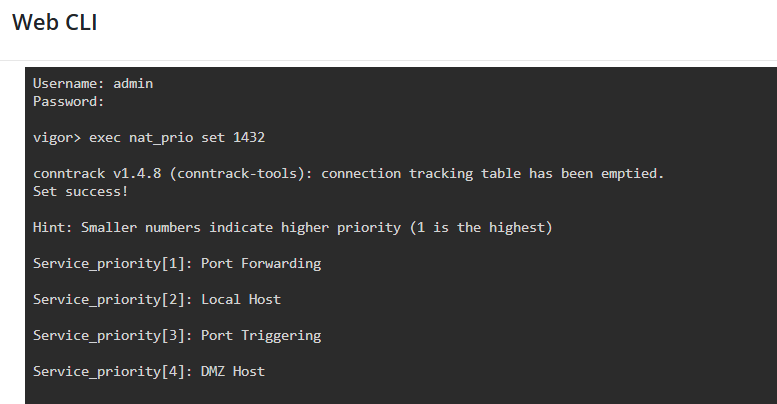
2. Modify the NAT priority using the command: exec nat_prio set 1432
In this example, the desired NAT order is:
Additional Notes
Published On:2025-12-09
ShareWas this helpful?